 Giving
Giving reports your treasurer will like.
See what came in, what you received after fees, and what was refunded.
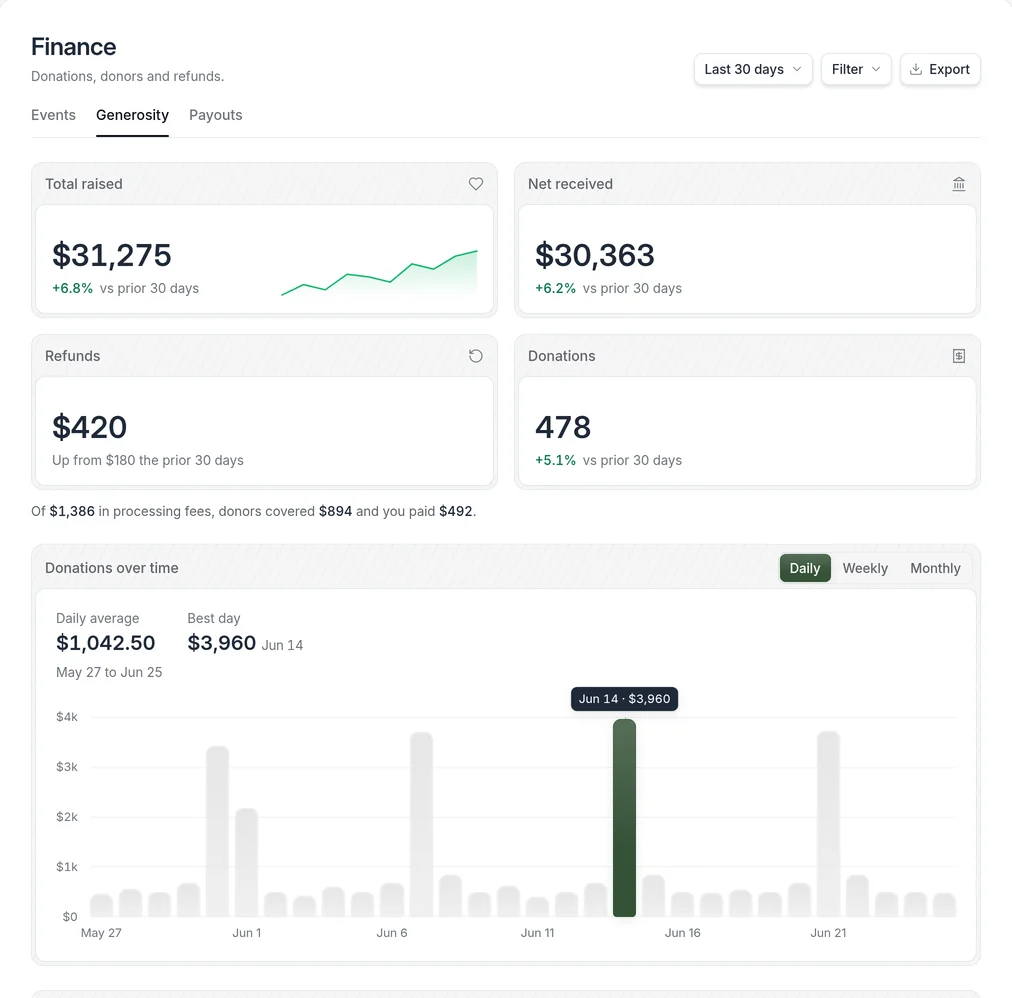
What should a giving report show?
A good giving report shows what came in and what you kept. Bless Giving reports show total raised, net received after fees, refunds, and the number of donations, with a daily, weekly, or monthly chart. You can compare recurring and one-time giving, see your top funds, and export the data.
- Part of
- Bless Giving
- Available on
- Every Bless Giving plan, with no monthly fee
- Gift fee
- 30¢ per gift plus Stripe, never a percentage
- Payouts
- Your own Stripe account, in your bank the next business day
Giving reports, in detail.
- Raised and received
- Total raised, net received after fees, refunds, and number of donations.
- Over time
- A chart of donations you can view daily, weekly, or monthly.
- Recurring and one-time
- See how much comes from recurring gifts compared with one-time gifts.
- Top funds
- See which funds raised the most.
- Export
- Export your giving data whenever you need it.
Guides on giving reports.


Giving reports questions.
Don’t see yours? Talk to our team. A real person will answer.
Can we see what we received after fees?
Yes. Reports show total raised and net received, so you can see the fees.
Can we export giving data?
Yes. Export your giving report from the Finance screen.
Can we compare recurring and one-time gifts?
Yes. Reports show how much comes from recurring gifts compared with one-time gifts, and which funds raised the most.
How often can we view giving?
The donations chart shows giving by day, week, or month, so you can check a single Sunday or a whole year-end campaign.
More answers in the help center.